
Load testing is a critical practice for validating the reliability, scalability, and performance of web services. While there are many established tools in the market, there is often a need for a lightweight, scriptable, and easily extensible solution that can be quickly integrated into development or CI/CD workflows. The Load Test Tool is a Python-based HTTP stress testing script designed to address this gap with simplicity and performance in mind.
This tool focuses on multithreaded execution, real-time feedback, and actionable performance metrics, making it suitable for both quick local tests and more aggressive stress scenarios.
Architecture and Design
The Load Test Tool is implemented in Python and leverages standard, well-known libraries to ensure portability and ease of maintenance. Its core design principles are efficiency, transparency, and configurability.
At the heart of the tool is Python’s ThreadPoolExecutor, which enables concurrent execution of HTTP requests across multiple worker threads. Each worker maintains its own requests.Session, allowing for efficient connection pooling and reduced overhead when issuing a large number of requests.
This approach provides a good balance between simplicity and performance, especially for I/O-bound workloads such as HTTP request generation.
Key Features
Multithreaded Execution
The tool uses a configurable number of threads to simulate concurrent users. This allows developers to model realistic traffic patterns and understand how their application behaves under load.
Connection Pooling per Worker
By using a dedicated requests.Session per thread, the tool efficiently reuses TCP connections. This more closely reflects real-world client behavior and avoids the cost of repeatedly opening and closing connections.
Real-Time Progress Tracking
A visual progress bar powered by tqdm provides immediate feedback during test execution. This is particularly useful for long-running tests, as it allows users to monitor progress without waiting for the final report.
Performance Metrics
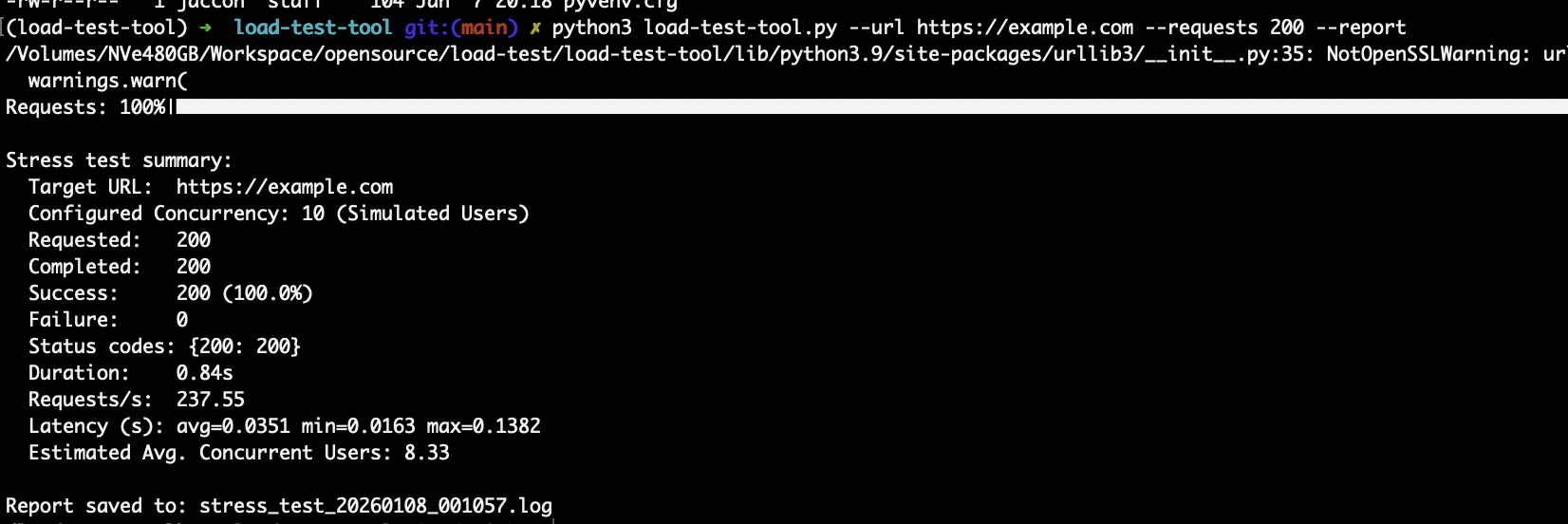
After the test completes, the tool calculates and reports key metrics, including:
-
Requests per second (RPS)
-
Average, minimum, and maximum latency
-
Success rate
-
Estimated average concurrent users, derived using Little’s Law (RPS × latency)
These metrics provide a clear, quantitative view of server performance under load.
Reporting and Logging
When enabled, the reporting feature generates timestamped log files containing a full summary of the test results. This makes it easy to store historical data, compare runs, and attach results to incident reports or performance reviews.
Paranoid Mode
For aggressive stress testing, the tool includes a “Paranoid Mode” that maximizes concurrency based on the number of available CPU cores. This mode is intended for intensive testing scenarios and can optionally be capped with a maximum request limit to prevent uncontrolled execution.
Installation and Dependencies
The Load Test Tool requires Python 3 and relies on two widely used libraries:
-
requestsfor HTTP communication -
tqdmfor progress visualization
Installation is straightforward and can be completed using pip:
No additional system-level dependencies are required.
Usage and Configuration
The script, named load-test-tool.py, can be executed with default parameters or fully customized using command-line flags.
Basic usage runs a simple test with predefined defaults, while advanced usage allows customization of the target URL, total number of requests, concurrency level, HTTP method, and timeout.
In addition to CLI flags, the tool supports configuration via environment variables. This is especially useful in containerized environments or CI pipelines where configuration is often injected at runtime. Command-line flags always take precedence over environment variables, ensuring predictable behavior.
Understanding the Results
At the end of each execution, the tool prints a concise summary that highlights the effective load applied to the system and how it responded. The estimated average concurrent users metric is particularly useful, as it reflects the actual pressure exerted on the system rather than just the configured thread count.
This distinction helps teams better correlate test results with real-world usage patterns and capacity planning assumptions.
Responsible Usage and Limitations
As with any stress testing tool, responsible usage is essential. Tests should only be run against systems you own or have explicit permission to evaluate. High concurrency levels can consume significant local CPU and memory resources, so monitoring the testing machine is strongly recommended.
Additionally, operating system limits, such as the maximum number of open file descriptors, can become a bottleneck during very high-concurrency tests. These limits should be reviewed and adjusted if necessary.
Repository Github
To download use:
https://github.com/jaccon/load-test-tool